Windows 10 and Windows 11 Are Horrible
Disclaimer: the tone of this is dramatically more harsh than I usually am, but that's also because of the offhandish and arrogant remarks I got from people who are disgustingly and blindingly loyal to "Windows" or "Microsoft" (nobody should be loyal to a product that's not actually good in my opinion, unless you're an investor... which would mean you're just lying about its quality anyway). I'm responding like for like. They dismiss legitimate bugs, legitimate privacy concerns, legitimate usability problems, legitimate architectural flaws.
To top it all off, they are not technical but think they know more than everybody else: misinterpreting what Windows errors actually mean and never actually providing help to those actually frustrated by Windows... but demand it's a flawless product? Confidently wrong just like LLMs before LLMs were a thing. It's such a bizarre and hollow phenomenon. As part of my job, I actually have to deal with Windows (all flavours) and Microsoft's products at a comprehensive and technical level... I like getting paid, after all.
This has been reviewed by other technical people in the field who can vouch for its authenticity and accuracy. What follows is over a decade worth of documented frustration.
Index: Writing on the Wall, The Data Collection Begins: Enter Ed Bott, Bugs bugs bugs bugs, Windows 11 Still Has MS-DOS Errors, The Nags Were Always There, Nothing is Consistent, Dark Mode is Broken, Windows 11 Rotting Design, Regressions and the Sweenster, Bill Gates Himself Calls Windows 'Crapped Up', Microsoft Can't Spell (NTDSUTIL), The Future Is Changing, Others Are Fed Up
Writing on the Wall
When Windows 10 was released, the writing was on the wall. Microsoft was ramping up their data collection to a degree nobody had ever seen and the quality of the product was plummeting. Really it began with Windows 8, but at least Windows 8 was actually usable. There's a few handful of people who correctly recognised that Windows 8 was the last decent Windows, surprisingly one of them even being Luke Lafreniere from Linus Media Group (do not mistake me for being favourable to LMG though).
Something you should know: if Microsoft could have released a "Windows 11" in 1995, they would have. The only reason why their products unintentionally respected privacy at the time was due to technological constraints. Their corporate culture fostered on Bill Gates' cutthroat and vindictive style was never one of benevolence or placing the customer's interests above their own. Also, after Bill's deposition, Microsoft was swift to kowtow to any requirements the US government had.
In a now-censored paragraph of Wikipedia, you have a glimpse at how distasteful Microsoft has always been:
The logo originally resembled a deformed radiation warning symbol. Controversially, the original name for the DirectX project was the "Manhattan Project", a reference to the US nuclear weapons initiative. Alex St. John, creator of the original Microsoft DirectX specification, claims that the connotation of the ultimate outcome of the Manhattan Project (the nuclear bombing of Japan) is intentional, and that DirectX and its sister project, the Xbox (which shares a similar logo), were meant to displace Japanese videogame-makers from their dominance of the video game industry. However, Microsoft publicly denies this account, instead claiming that the logo is merely an artistic design.
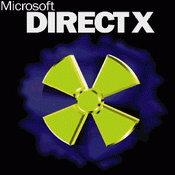
Consider this (my) ultimate smackdown of why Windows 10 and Windows 11 are equally horrible. I'm a little disappointed nobody noticed Windows as we know it died with version 10. Those with the rose tinted glasses who somehow think it was good are eating the same meal with version 11.
*** click on any photo below to enlarge it ***
The Data Collection Begins: Enter Ed Bott
CEIP (Customer Experience Improvement Program), invasive telemetry, constantly phoning home, Delivery Optimization "WUDO" (which Microsoft uses YOUR bandwidth to send updates to other machines so they can save money), and much much more... all made its aggressive debut in Windows 10. It was bad, it was buggy... and to stop the masses from thinking otherwise Microsoft had evangelist Ed Bott write this infamous piece a mere 27 days after Windows 10's release:
- No, Microsoft is not spying on you with Windows 10 Ed Bott's magnum opus
It worked... everyone always referenced this stupid substanceless (!!!) article whenever I brought up the fact that Windows 10 was pure spyware from its data collection methods (I wasn't reading "tinfoil hat conspiracies" or even other articles, it was done through my own private observations and analysis. Data collection from companies isn't even a conspiracy). I would really love to know how much he got paid to embellish that piece, the payday must have been great. Cha-ching!
I don't know if it was just hopeful wishing on their part or legitimate ignorance: if you're technical it's really not hard to prove, and in later years many did show just how chatty and invasive Windows 10 is. The outrage these same people have for Windows 11 is highly misplaced though because Windows 10 was the progenitor. Getting mad at something they were already warned about??? Okay. You guys should have expected Copilot and Windows Recall, that's an extension of the Windows 10 experience.
On July 11, 2016, an anonymous Wikipedia contributor (from Turkey of all places) noticed Ed's Microsoft bias a year after it ramped and added this now-removed comment to his page:
~ he (Ed Bott) has made a name for himself with his renown pro-Microsoft bias.
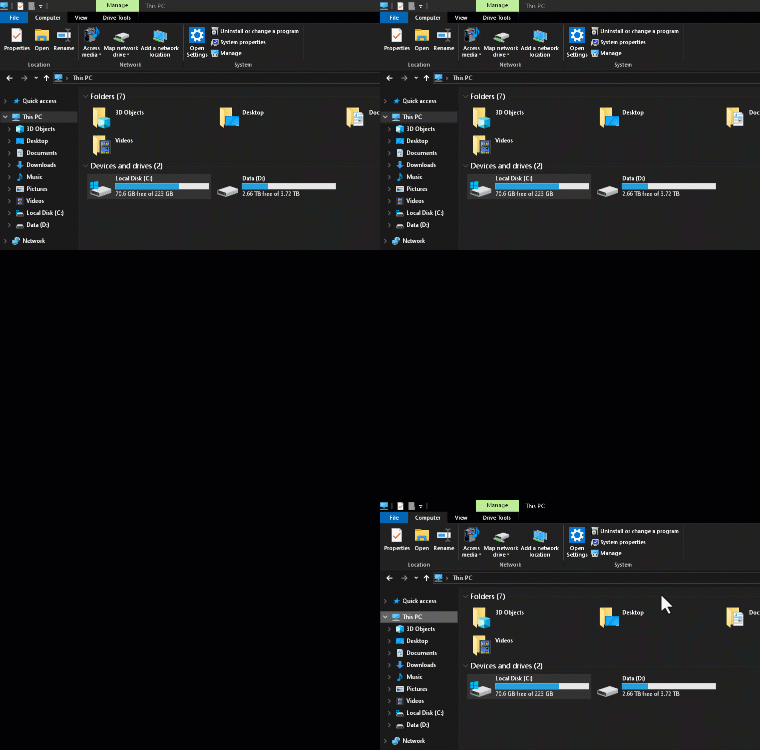
What's more, even in Windows 8 when you disable things like CEIP (Customer Experience Improvement Program), it does not actually disable it. Windows 10 and beyond are no exception, in fact Windows 10 tends to be a little bit more honest only allowing you to choose between "full" and "basic" rather than "disabled". It will continue to phone home and send data, and you can observe this in the screenshot below:
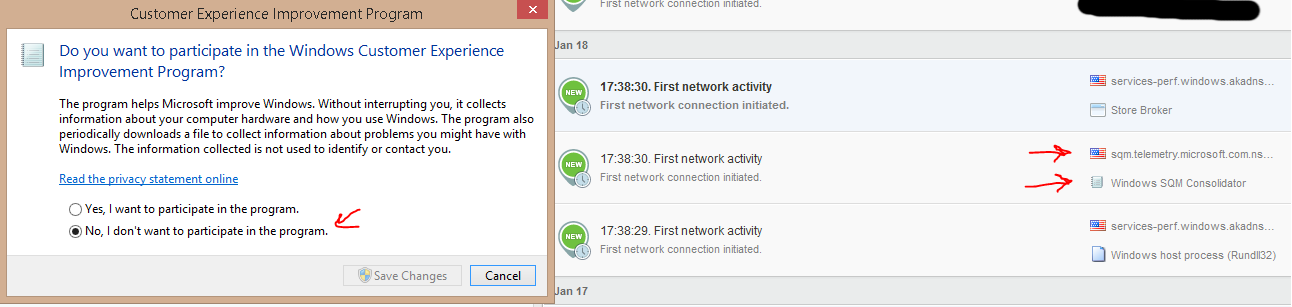
While sqm.telemetry.microsoft.com is not "supposed" to collect personally identifiable information, it's virtually impossible to scrub out accidental metadata that can identify you (and ANYONE with the minimum required knowledge in computer science will ratify this): let's say a file path has your name in it for instance, it's very common for people to put their names in file paths... well... now your full name is tangentially inhaled straight into sqm.telemetry.microsoft.com (or v10.vortex-win.data.microsoft.com). And again... the egregious part is that it's lying about what I'm telling Windows to do, it wasn't actually disabled. Something that Ed Bott insists wouldn't happen! And this is on Windows 8!
It's impossible for a device with so much (already) sensitive information to reach a 100% perfect situation where NOTHING personal or identifying is ever accidentally extracted. In fact, Windows' EULA makes no provisions to protect you from accidental data collection when these situations will inevitably occur: shouldn't Ed Bott address this glaring problem for consumer protections? Sheesh. The omission of being protected from metadata accidents is very telling. If anything the EULA encourages it, and when Microsoft faced mounting backlash a year after Ed wrote his magnum opus, they simply altered their 'privacy statement' but kept the EULA as it was.
Remember, Microsoft ended up forcing unsolicited installs of Windows 10 on many Windows 7 machines. In fact... I had already anticipated this and altered Windows Update on my grandma's Windows 7 PC right after Windows 10 was released. Eventually, all of my grandma's friends had their PCs automagically upgrade to Windows 10 and they were confused and had trouble using the new system, but my grandma was also baffled as only hers was still fine. Later I told my grandma I knew Microsoft was going to do something like this and that's why her PC stayed on 7 when everyone else's didn't-- only her grandson was the one ahead of the curve. Microsoft was HUNGRY to push 10 as Windows 7 had a much smaller aperture for data collection. Worry not though, as a countermeasure to potential reverted installs or people who remained on 7, they also quietly backported DiagTrack to Windows 7 (and 8), refer to KB3022345. In another one of Ed Bott's articles on the matter, he was completely silent about Microsoft's efforts on backporting DiagTrack:
Instead focusing on repeating "nothing secret about them / it's not a secret" and also that it's architected as a component of Windows (10)....... not exactly if they can just backport it to previous versions that were never designed for it. Yeah okay Ed... how many people at the time knew that Microsoft was backporting all of this to the previous versions of Windows when it wasn't necessary? This also highlights the increased data collection on Windows 7 and 8 that hadn't previously existed.
The misdirection of focusing on Windows 10 in that article is very telling. In my opinion, if you read Ed's articles they always downplay everything, and it's annoying. Windows 7 machines were already unsolicitedly upgraded to 10 before Ed published his "warning". And how come I anticipated this before Ed even wrote anything? I'm not a prophet, it's JUST OBVIOUS what kind of company Microsoft is.
Ed does absolutely nothing with analysing DiagTrack, the binary blobs, the associated regex filters. Instead using... resmon.exe, really Ed??? What's THAT going to tell you about what's actually collected, how, or why? Are you going to run "tree" against system32 next? Maybe run a ping to update.microsoft.com? This is what should infuriate anyone who is actually technical, these people don't know what they're doing or saying. Any sysadmin or security analyst worth their salt would burst out laughing at what Ed wrote.
- DiagTrack (Connected User Experiences and Telemetry) stores copious amounts of data in: %ProgramData%\Microsoft\Diagnosis\ETLLogs\AutoLogger\, Ed ignores this directory. According to Fortinet, even enabling it to the 'full' telemetry (3) does not expressly result in the .etl (AutoLogger-Diagtrack-Listener.etl) file being populated. The exact means are not public and undocumented... Ed mentions none of this. But guys! He launched resmon.exe! That will tell us everything! You have to be chewing crayons and drinking glue to think resmon produces forensic data analysis needed for software this sophisticated; yes it's sophisticated-- probably more so than the entirety of Windows as they hired big talent to build it. Ugh.... Oh, and if you look what it stores, it totally captures network connection history and usernames from directories (i.e. C:\Users\EdBott\Desktop~). So if Ed uses "EdBott" as his username, everything is now fingerprinted to him.
- It's not merely 'logging' or 'collecting' passively. DiagTrack behaves more like an EDR and can be remotely manipulated on its behaviours to Microsoft's whim (I don't see any mention of OneSettings in that article), so there's no "waiting" it's a continuously controlled agent. Since it's an agent, Microsoft can adjust its settings like a rubber ruler-- the hungrier they get, the more they can retool it to take. Ed makes no mention of this.
- The RBS files do in fact contain hardware serials, MAC addresses, unique GUIDs, external device history, and even document properties. So if you name a file something like "Ed Bott Loves Cheese.DOCX", well, suddenly Microsoft knows this now, too.
To Ed's credit, he does advise that it's possible for Microsoft to collect business and personal information -- but only "at the Enhanced setting" (and this also contradicts his original claims about there being spyware at all; the data collection Microsoft employs does enter spyware territory). My issue with that statement is: we've already proven Microsoft doesn't honour their word or good faith which Ed is assuming here, and he doesn't seem to care the EULA doesn't protect us from accidental data collection. Windows does not disable CEIP when you choose the option to, we have no idea 'what' triggers creating AutoLogger-Diagtrack-Listener.etl (setting the value is not enough), Microsoft performed unsolicited upgrades when they knew it was against their customer's wishes, and the whole Windows telemetry system is an active agent that can have a binary blob change its behaviour whenever Microsoft wants. There is no guarantee they will honour what they said they would collect. The EULA absolves them from all responsibility. Ed Bott may have that kind of blind faith in Microsoft, but I don't.
It's like placing faith that all vendors respect robots.txt; it's just a suggestion. They don't. And they don't have to. Microsoft doesn't have to keep its promises, it's not legally obligated to with that EULA.
Well... it didn't take long because Microsoft would implement a GDID (Global Device ID) in Windows 11 when you create a Microsoft Account, hilariously placing the PUID in plaintext in the registry: HKCU\SOFTWARE\Microsoft\IdentityCRL\ExtendedProperties.
Obviously it cannot be turned off and the level of telemetry and data collection you choose has no bearing on it (something that contradicts Ed Bott's data collection pieces, which everyone technical under the sun warned him about over and over). It applies and gets migrated around with you whenever you use the Microsoft ecosystem. Now, if someone wants to weasel around the issue and simply say you shouldn't create a Microsoft Account: remember that Microsoft is actively working to retire local accounts entirely for standard users. Even worse, those who create a Microsoft Account to simply log in and then create a local account afterward have still poisoned the machine with the GDID.
Ed has been dead silent on the Windows 11 GDID, even in 2026. Gee, I wonder why. In fact, he doubles down insisting there's no spying (he loves that word) and you have nothing to be concerned with. Even worse, he's back at it recommending and using irrelevant pieces of software to analyse Microsoft's telemetry, insisting we use the first party "Diagnostic Data Viewer". Um, okay Ed, is that going to tell you about the GDID? Obviously not, it also does not reveal the undocumented behaviours of DiagTrack.
This is why journalists should not comment about anything technical without consultation.
Bugs bugs bugs bugs
Working with many computers, I've had the misfortune of actually living through how awful and buggy Windows 10 was. It was so prolific in its bugs that I just gave up and started saving all of the screenshots. And keep in mind this was across many PCs, not "just one". I would also hasten to add that Microsoft would deliberately leave real awful bugs unfixed until the next build.
I was accused by people with Microsoft Stockholm Syndrome that it was: "just an issue with your PC"-- again I was never working on "just one PC"--some of these were even fresh from the factory. I made this evident to them and they still insisted on this or that it was due to some unique customisation I implemented... even though once again, I told them many of these were out of box. I was deploying a lot of BRAND NEW Windows 10 PCs for customers at the time.
Or: "well I never had that issue". Both of those are logical fallacies. I don't know why it's so common for people with a Microsoft bias to dismiss real bugs and problems Windows exhibits this way; you also notice it on many of the Windows forums and Windows Reddit groups. Are you stupid? It doesn't matter if YOU don't trigger or observe the bug, that does not mean it doesn't exist within the Windows 10 codebase! I can only imagine how frustrated non-technical people are from those LARPing as if they're technical Microsoft geniuses-- but can't troubleshoot their way out of a paper bag and so blame it on the user or client for serious problems Windows has that they can't explain.
I actually tested the Windows 10 pre-release before it went public, on a non-frankenpadded T60p ThinkPad-- the ones with the OG Core Duos and FireGL. Well... the first thing that stood out to me is that the start button was busted, yes, even in the beta. You clicked on it and it did nothing. This problem continued far after the public release too, and multiple times even.
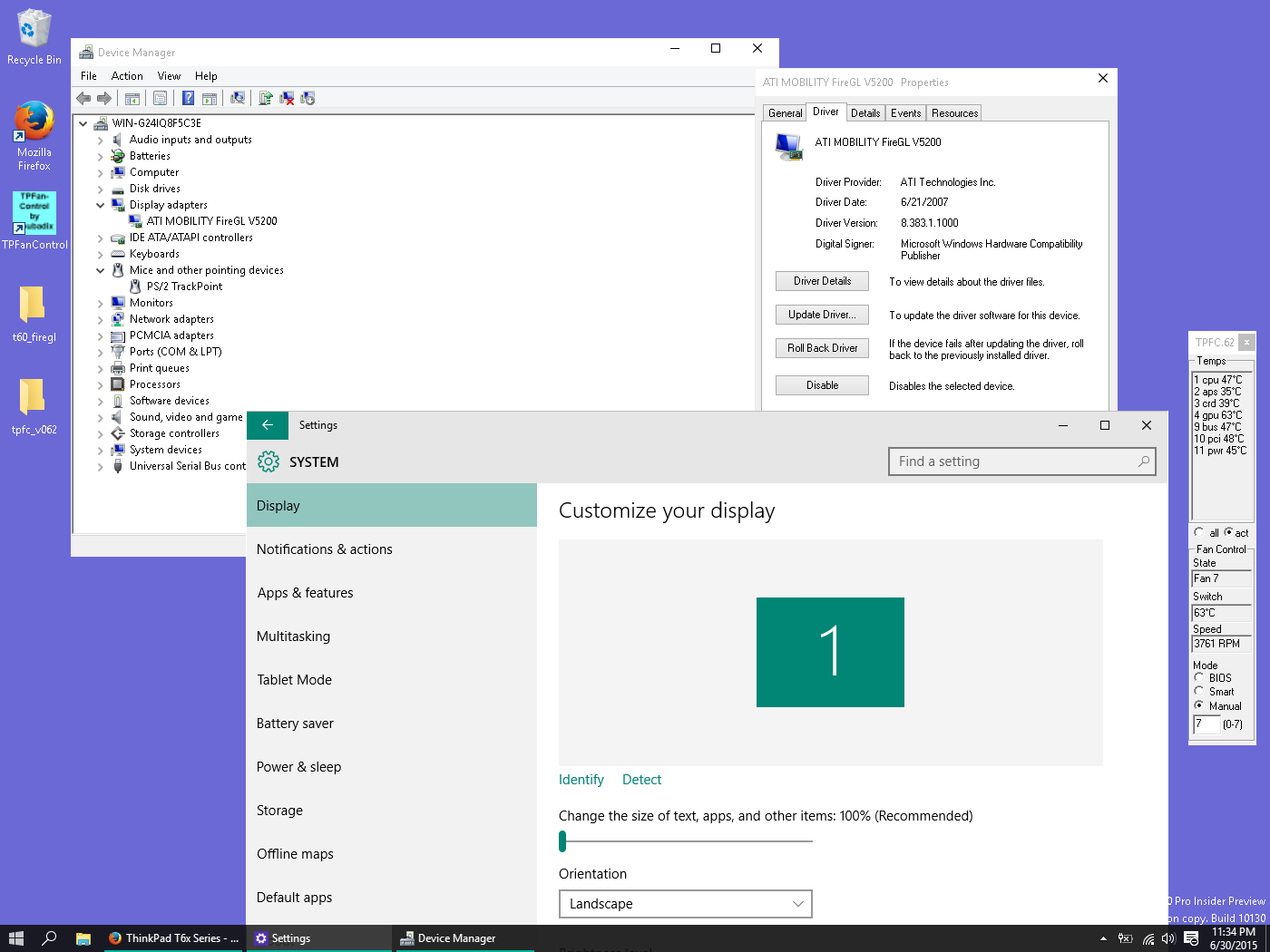
But it gets better, because there were a few times when the start menu did work for me, the text was completely missing! Hilariously enough I already knew the 'positions' of the text so I could still click them... but wow:
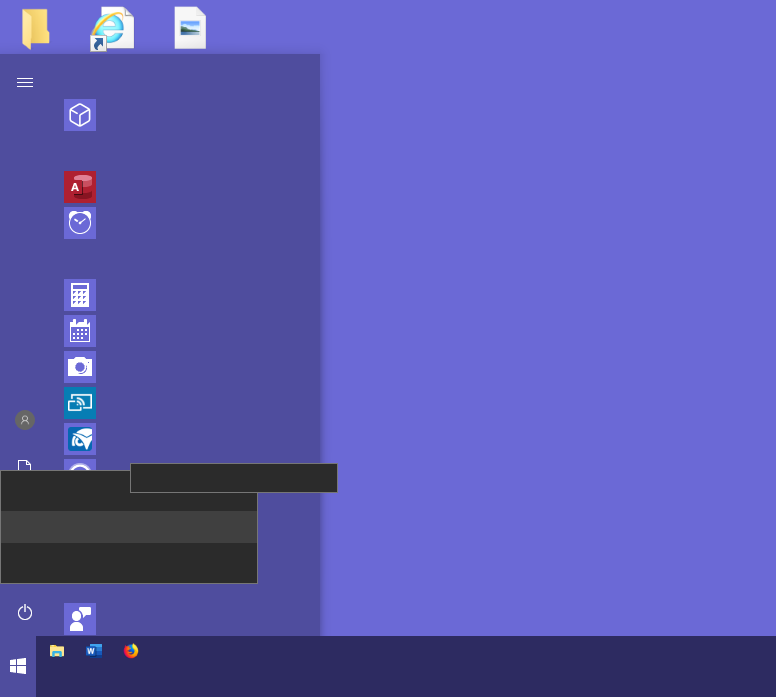
Another issue was with the whole Windows 7 to Windows 10 upgrader. If you had a Windows 7 install, you could do the in-place upgrade and it would attempt to keep all of your customisations from 7 over to 10. Except... Microsoft didn't think it through after they limited what colours you could pick on Windows 10 (something that CDE has always been able to do and dynamically changes the text to black or white depending on the background colour-- in realtime no less!). So because Windows 7 'could' store black text, Windows 10 would then forcefully use the illegal Windows 7 colours it wasn't supposed to and you'd get black text on a black taskbar:
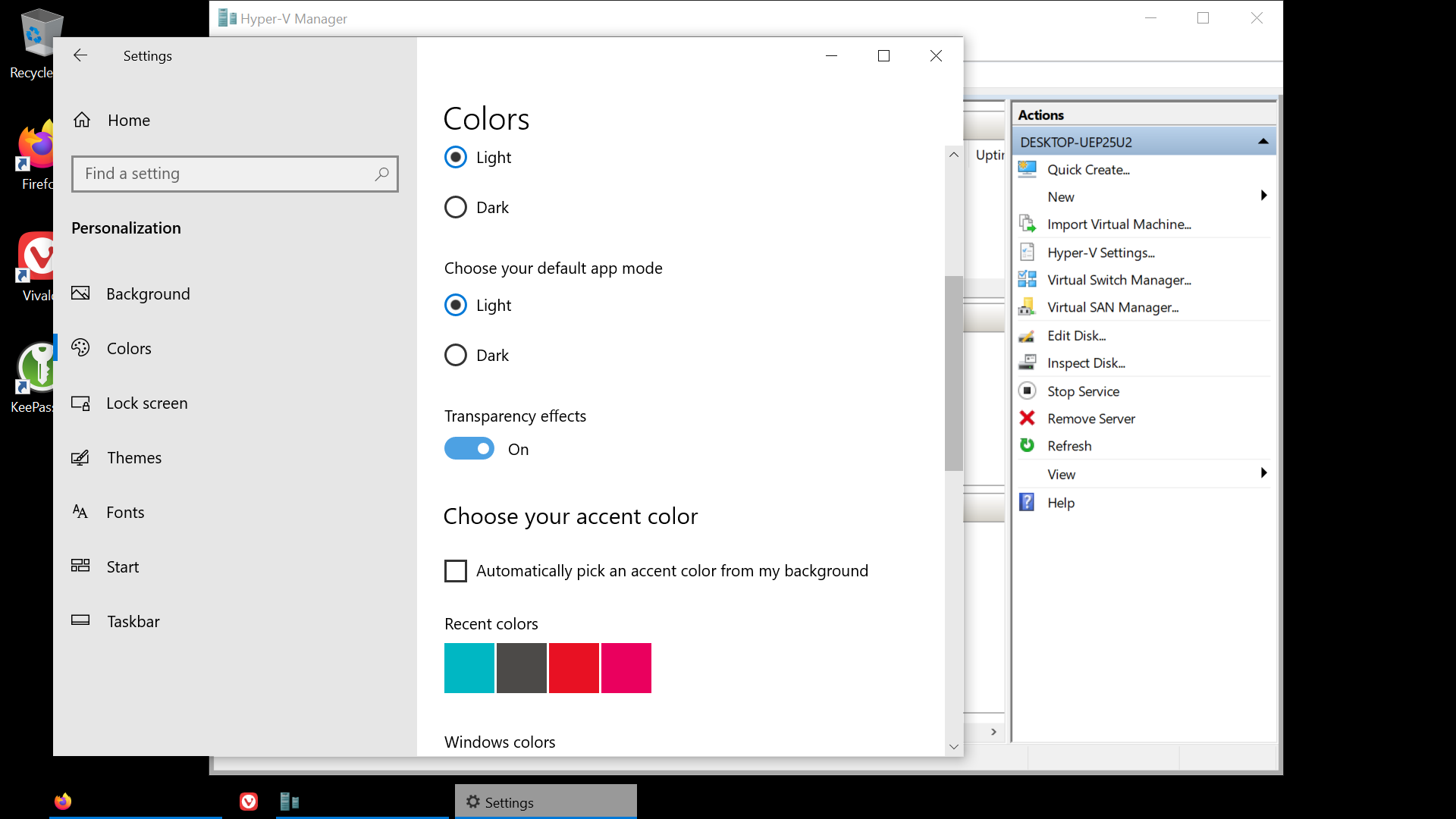
We're not done yet! In later builds (1903) where Microsoft finally introduced the "light mode" (with 1809 and prior it used schizophrenic dark taskbar and other dark elements with everything else being light), if your background happens to be black or already dark, by default the "light mode" is transparent so you will also lose the text but in a completely different way.
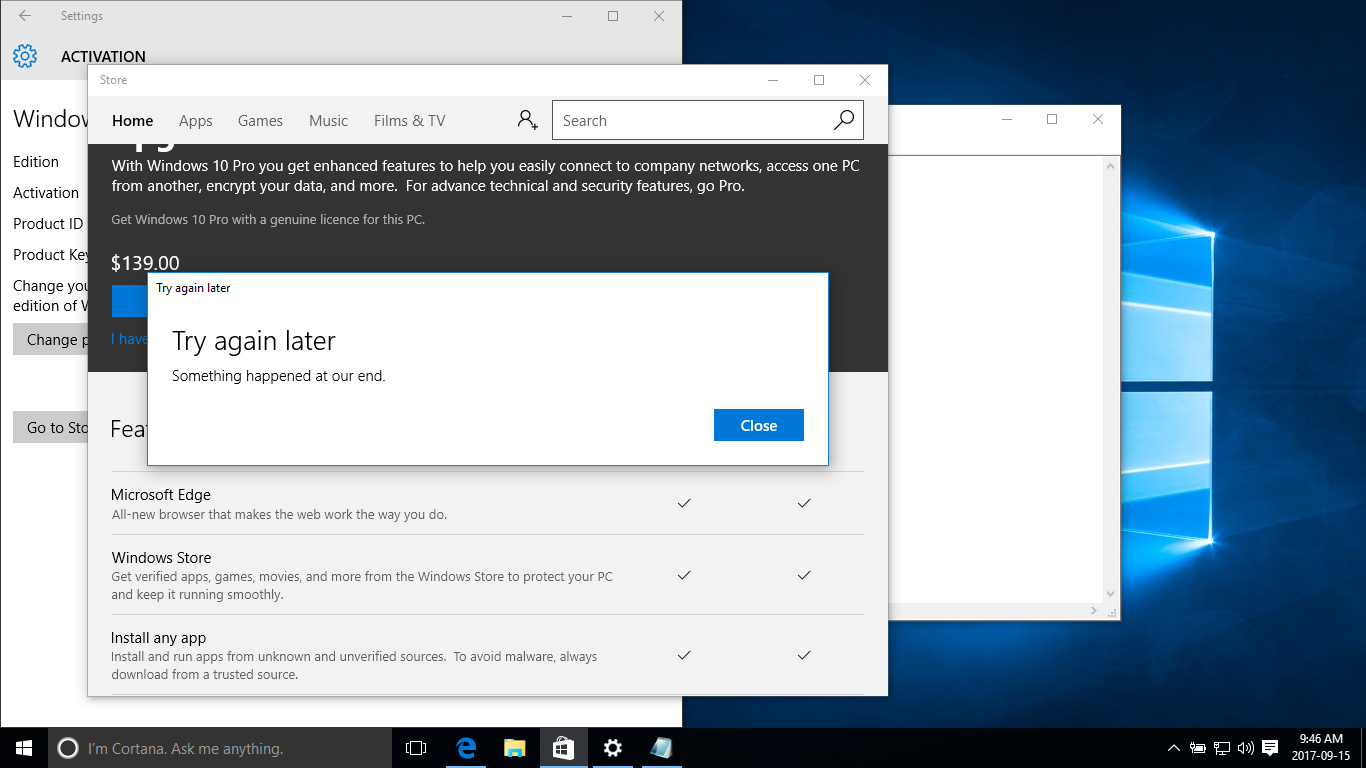
In Microsoft's infinite wisdom, for consumer releases of Windows 10 you HAD to upgrade it to Pro through the "Windows Store". But guess what... the Windows Store was coded in UWP (Universal Windows Platform) which was hardly ready for prime time even two years after 10's debut and could barely function. And so simply trying to upgrade 10 Home to 10 Pro would result in the: "Try again later, Try again later, Something happened at our end." And of course there's no diagnostic information.
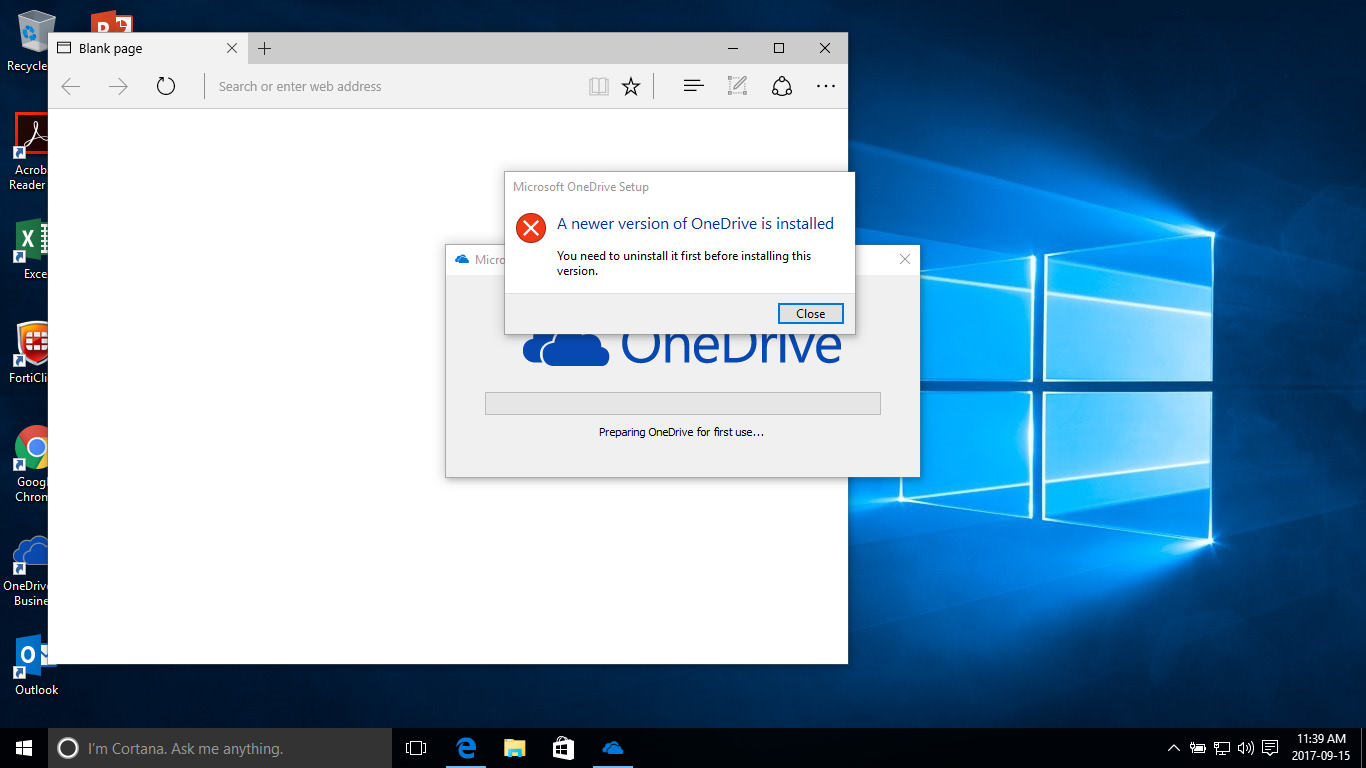
Then you would often get incessant nags that OneDrive was out of date... but upon attempting to placate Windows 10's INSISTENCE that OneDrive was out of date, you would then get an error that "a newer version of OneDrive is installed"... if a newer version is installed then it's not out of date!
Microsoft was experimenting stripping out diskette support on Windows 10 during this time. I remember in one build it just so happened the computer I was using did have a floppy drive (I thought it was funny so I just left it in) and it was no longer showing up in Windows 10, then randomly after an update it re-appeared like magic! Microsoft was also playing around with removing the ability to create MS-DOS startup diskettes in Windows 10. I don't know why they were playing with both of these things at different times in different ways...
Years later I also got this bizarre error on my main work PC that was a Lenovo tiny at the time (which had no ability whatsoever to use an integrated FDD) when attempting to access a USB stick that must have had some data integrity issues: "The wrong diskette is in the drive. Insert correct diskette into drive E:\"... Windows 10 can't even tell what is or isn't a genuine diskette apparently? Its user space is plagued with artefacts from the DOS days. I've never even met anyone who consciously decided to change their FDD to E:\ away from A:\ -- because you'd be baselessly sacrificing a drive letter that's already precious as Windows is limited to the alphabet. An infamous problem that businesses run into when they run out of alphabets for their shared drives.
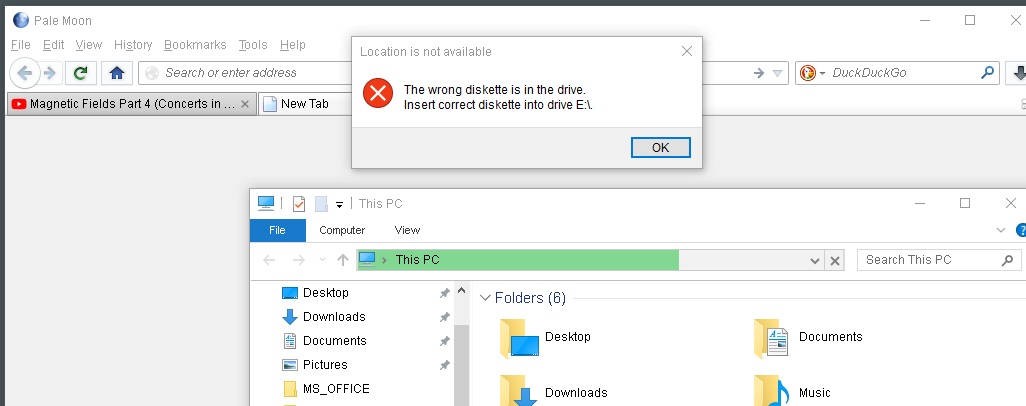
One overly zealous Microsoft supporter tried decrying that particular screenshot as false because "my fonts were weird"... uh... that's because I disabled anti-aliasing and forced Arial in the system registry since I prefer sharp fonts on my main work machines, because I'm actually technical!... They'll find any excuse to discredit or to ignore Windows bugs and errors they don't like. If anything this also proves the sheer amount of different Windows 10 PCs I was using.
Windows 11 Still Has MS-DOS Errors
On the topic of MS-DOS remnants still being in modern Windows user space (it appears to be a contentious topic as Microsoft evangelists can't accept this? As if legacy code wasn't an obvious and given proposition given Windows' history; but they just want to deny it because it causes bugs-- and in their mind since Windows is perfect THERE'S NO WAY it could have MS-DOS errors strewn inside of it still), here's an infamous one:
Too many other files are currently in use by 16-bit programs. Exit one or more 16-bit programs, or increase the value of the FILES command in your Config.sys file.
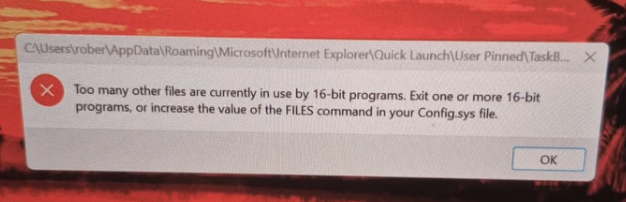
Source: https://www.instagram.com/reel/DWzLtMVFH6I/
(I wasn't able to generate it on Windows 11 myself, but have had faulting applications generate it on prior versions of NT-- but as you can see it's still well and alive on Windows 11)
Windows NT never had a Config.sys (it has no DOS kernel so how could it?!). Anyone with a basic understanding of Windows should already know this.
When a hardcore Microsoft evangelist or most help forums are asked about this, they're too dumb or stubborn to realise that this error is NOT from attempting to open a 16-bit program on Windows NT, some are so stupid they'll even insist you need to create a config.sys on NT. It's a false positive and has nothing to do with DOS, in some random vendor software they also go over how this is a false positive.
You would get an entirely different message for that on NT (duhhh, try opening a real 16-bit Windows application on a 64-bit Windows and find out for yourself-- and 32-bit Windows can already open 16-bit Windows applications just fine), and if you look at the faulting applications, they are not 16-bit or even remotely related to DOS. Furthermore, Windows NT would never advise you to edit an invisible Config.sys if it was coherently giving you a valid error message or telling you about a 16-bit *Windows* program (technically DOS-based Windowses did indirectly rely on Config.sys for 16-bit Windows applications but that's unrelated).
In fact, let's audit shell32.dll from Windows 10 and 11. We see that there are even more MS-DOS exclusive errors left over (ones that not even I was aware of!). It's not possible for any version of Windows NT to legitimately incur string 6145, 8451 (as discussed), or 9823 -- any calls to these strings will be false positives:
| String ID | Error |
|---|---|
| 6145 | Invalid MS-DOS function. |
| 8451 | Too many other files are currently in use by 16-bit programs. Exit one or more 16-bit programs, or increase the value of the FILES command in your Config.sys file. |
| 8454 | The specified program was not designed to work with Windows or MS-DOS. |
| 8464 | MS-DOS Application |
| 9823 | The specified value for DOS protected-mode (DPMI) memory is not valid. Specify Auto or a value from %u to %u. |
I'm guessing string 8464 would be incurred if you tried to run a legitimate MS-DOS program, maybe? But would a Windows 11 user really need to know that? As to why Windows 7, 8, 10, 11 are specifically obsessed with using string 8451 for legitimate 64-bit Windows applications when it encounters certain problems, I do not know why. It would be funny if it generated something for 6145. It's stupid that 64-bit versions of Windows reference a "shell32" instead of a "shell64", Microsoft hard coded everything and they can't expunge the 32 nomenclature when it's no longer relevant. That goes for "system32" as well. What. A. Complete. Mess.
But, LALALALALALA, Windows evangelists do not want to admit pure MS-DOS errors still exist in their beloved product or that it messes up and calls the wrong strings. Of course Microsoft will never be able to remove these or their operating system would no longer properly function, especially since NT has its wires crossed and is referencing stuff it shouldn't.
The Nags Were Always There
Many are getting irritated by the Copilot nags in Windows 11... but did you forget? Windows 10 was laden with nags so nothing has changed. Why are all of you mad now when this IS ALREADY a carryover from the "Windows 10 experience"? It would constantly spam you with "The recommended browser", and this was when Edge was still built on Trident so they kept having to give you all these reasons why it was FASTER and had a SUPERIOR BATTERY LIFE over Chrome.
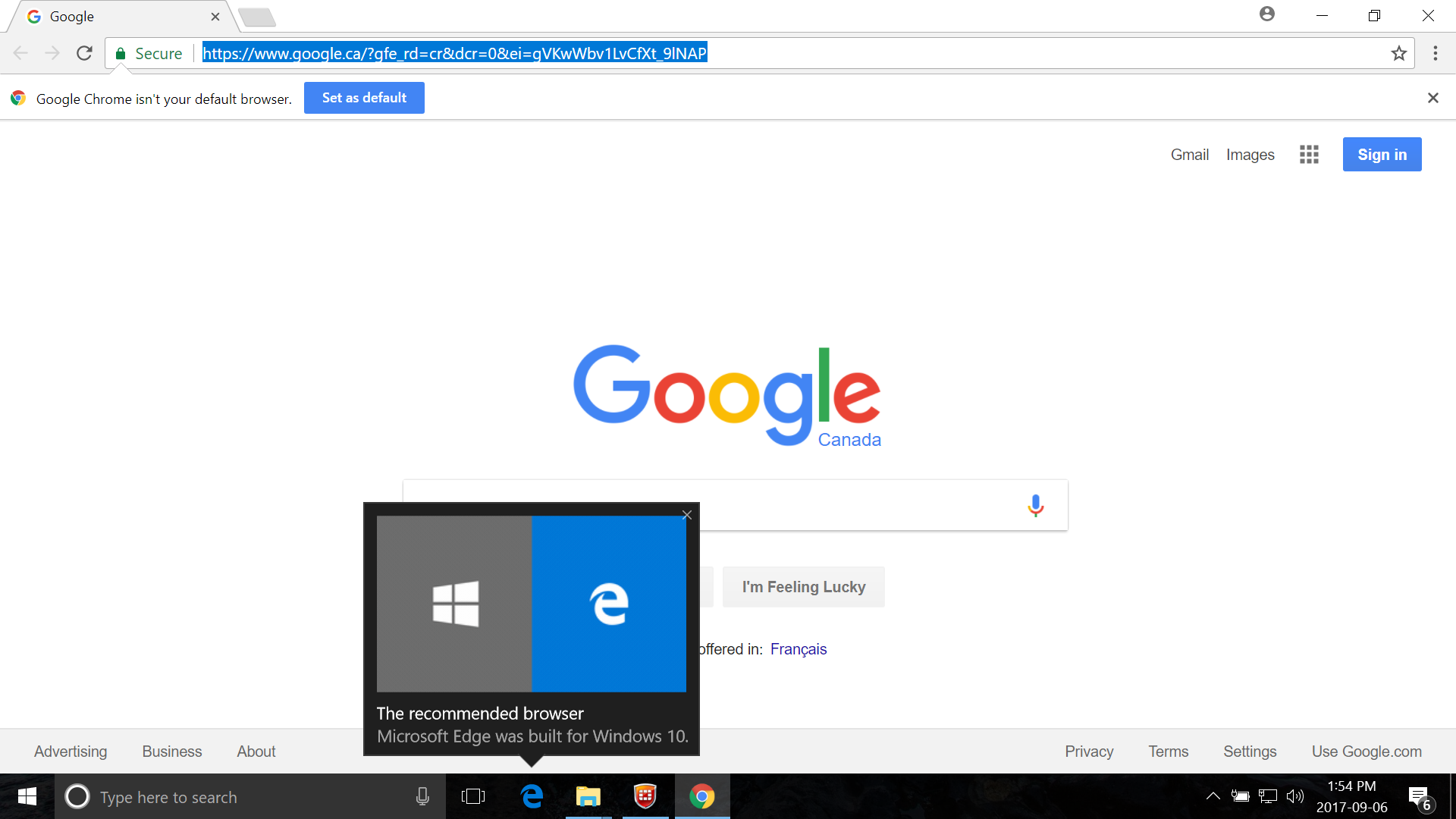
Apparently Microsoft didn't eat their own dog food now that Edge is based on Chromium. So they lied to us??? Quick! Get Ed Bott to write another article on why Edge on Chromium is actually better than Chrome even though it's the same and even though we said the Trident one was better! Oh wait... he seriously did...
Nothing is Consistent, Dark Mode is Broken
Because Windows is stuffed with so much legacy garbage and because Microsoft never had a proper FUTURE-PROOFED standard for anything... and they keep changing the standards they do have (don't even get me started on roaming profiles and fslogix-- if you know, you know)... and they try to half-ass backwards compatibility where you THINK things are backwards compatible at a glance but they're really not and the whole operating system is building up so much technical debt that it's neither good at being modern OR supporting legacy junk... well we arrive at our present destination that is Windows 11.
Microsoft is unable to consistently theme their operating system due to how many "standards" they have, and way too much legacy stuff is left abandoned or not refreshed.
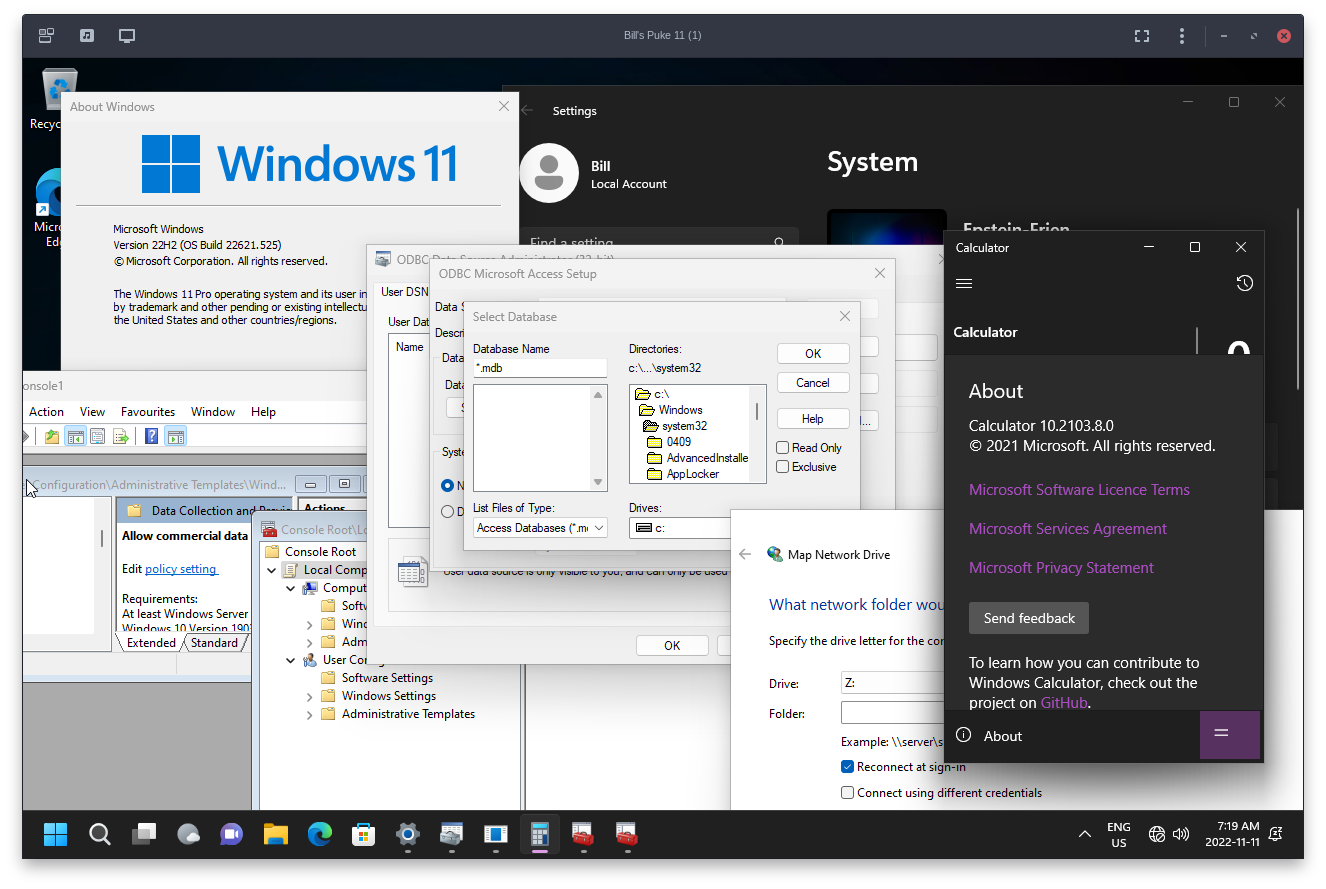
Photo courtesy of Sapphirus
What's more, Windows is designed to always draw windows in plain white first before they're rendered-- so if you're like me and you disable all of the silly animations and set Windows to dark mode, you'll be "flashed" by momentary screens of white. Update: someone recently told me this no longer happens for them on the latest build with Windows 11, so it's possible Microsoft finally fixed it?
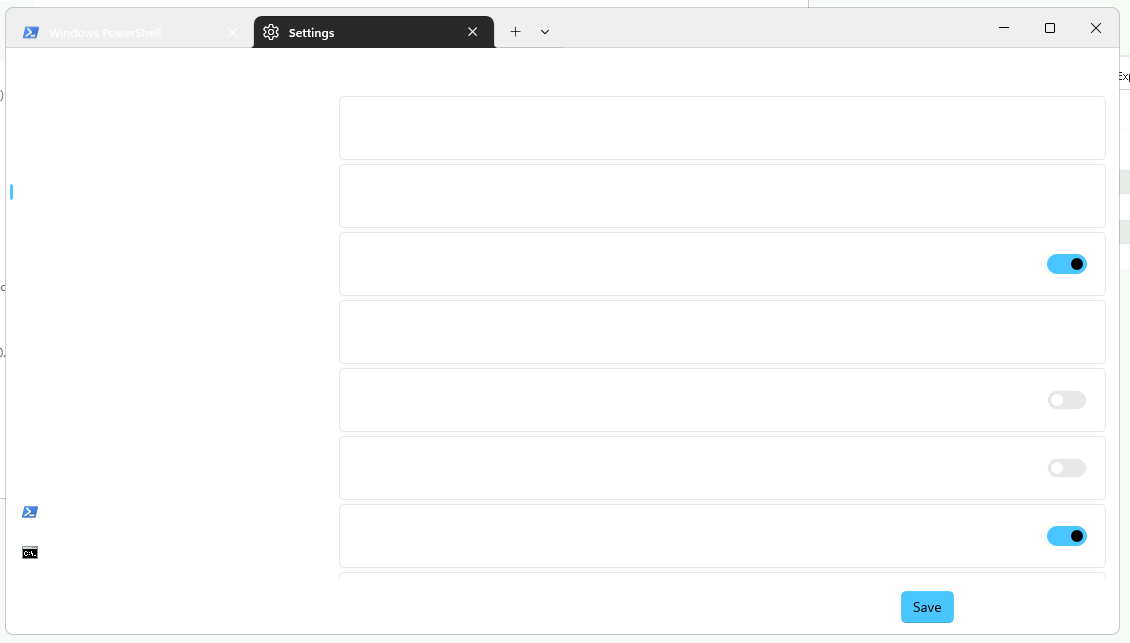
On the Windows 11 terminal, it defaults to dark mode for its theme instead of "system managed", probably because, as you'll see they built it in reverse of what each light/dark mode should be. If you are already running light mode and then change it to system managed, you'll lose the ability to see all texts because it can't accommodate the edge case-- in any other operating system it wouldn't overcomplicate things like this, everything would be designed around to handle system manage and dynamically adjust based on the global system preference:
Windows 11 Rotting Design
Going back to the point of UI inconsistencies, if the DPI is higher than Windows anticipates for SOME win32 programs, it'll simply blow up the pixels with nearest neighbour filtering so you have this incongruency of high fidelity fonts and buttons with a stark change of highly pixellated garbage. And it's not like this is vintage software, Microsoft enabled developers to become inconsistent because their operating system is inconsistent. Why don't we have these problems on macOS? Because Apple keeps everyone consistent.
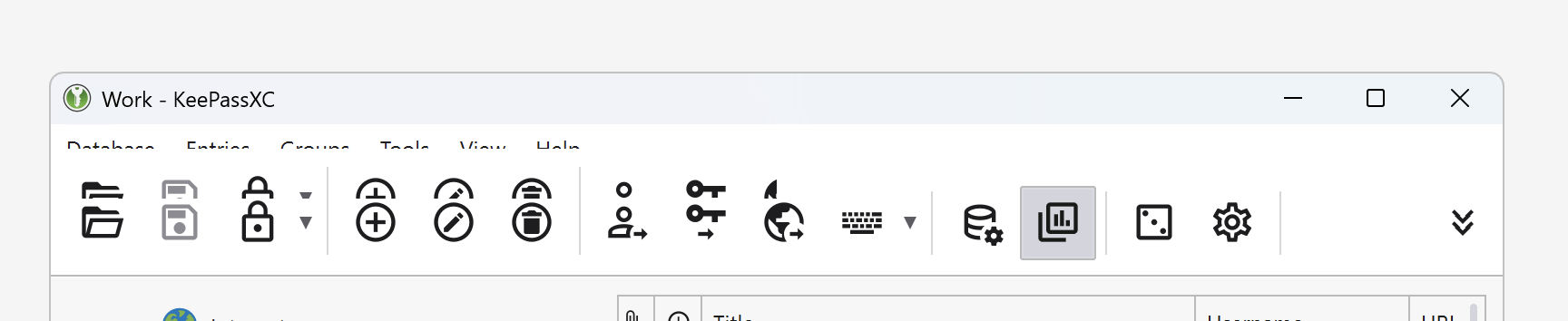
And in one instance when I was using KeePassXC, Windows 11 started repeating the toolbar like those classic memes where people tile the Windows 95 or XP error messages across the screen. Now listen, I use KeePassXC on many systems, including Linux and macOS. Neither of them ever did something stupid like this, but as soon as I use it on Windows 11, suddenly the worst comes out. And this is my Windows 11 work machine (that I had also recently just re-imaged mind you because of that SSD bug with Windows 11 that DELETED EVERYTHING ON THE SSD).
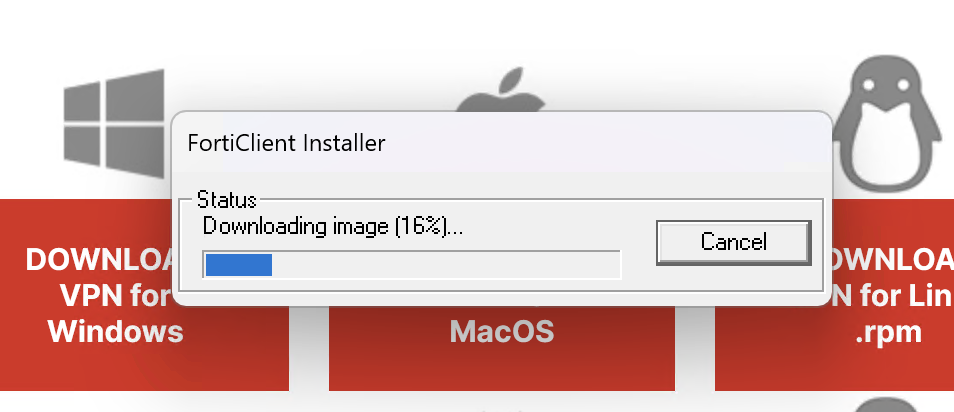
The KeePassXC developer also has a real big headache because it has C++ redistributable dependencies that Microsoft doesn't bundle and he's unable to have the installation package automatically look for and deploy. And upon advising Microsoft of this problem that people keep bugging him with, Microsoft does nothing. They don't care. So you just have to install them manually each time: and as Windows as no native package management, off to microsoft.com you go to download and install more floating binaries.
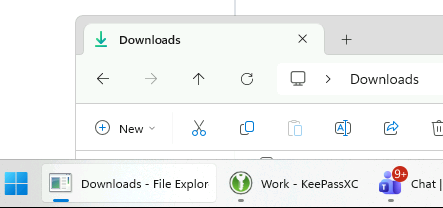
And it's not like these problems should be challenging to any software developer or a company that has resources like Microsoft. In Windows 11 it also has this habit of dropping the icons of opened instances of Explorer.exe in the taskbar. These are the kind of behaviours you'd expect from something in an alpha state... not even Windows 95 managed a bug this bad in its taskbar.
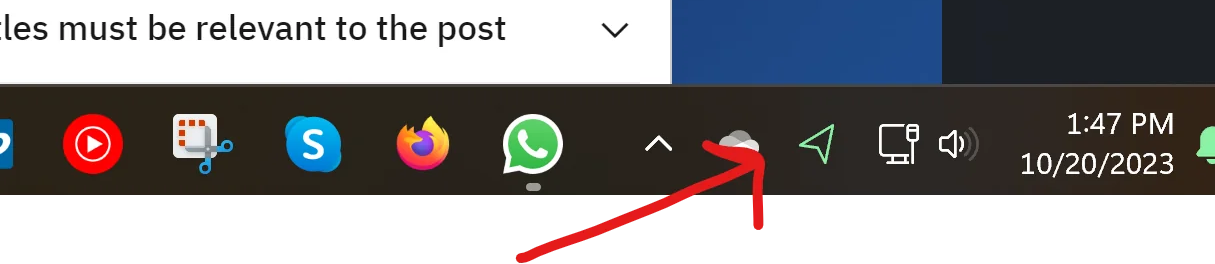
We're also now contending with the fact that seriously bad brand new decisions are being made in Windows 11. Take its new "location services", if enabled it'll constantly flash that paper plane icon and this behaviour cannot be changed. For someone like me it's far too distracting seeing it inconsistently blink at odd intervals. The only way to stop it is to disable location services entirely... so that's what I have to do. If Microsoft was thinking they'd just have the option to disable the icon of such a visually jarring problem that doesn't need to be a problem. It's such horrid design...
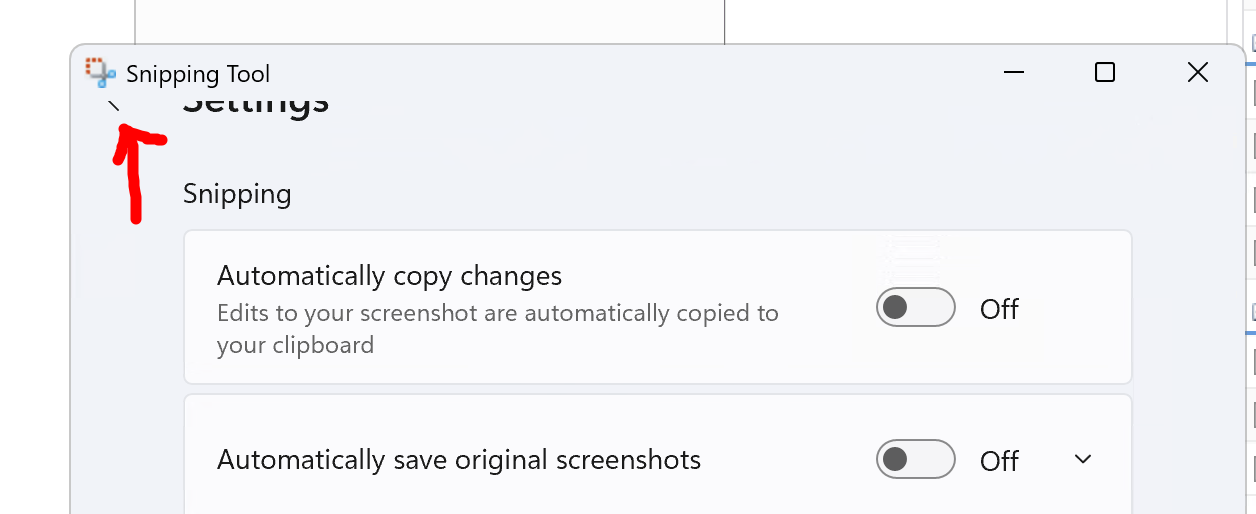
And another braindead decision they did (seriously, Microsoft is not testing this against real human users), in any of the "settings" options for the modern Windows 11 apps, you can only go "back" if you scroll ALL THE WAY TO THE TOP of the settings page. In a normal UI design you would either have: 1) the back button constantly floating so you don't have to scroll to the top to click it as you're stuck on that screen until you do, or, 2) add a "go to top" link on the bottom of the settings page like it's 1990 to compensate for their backwards thinking.
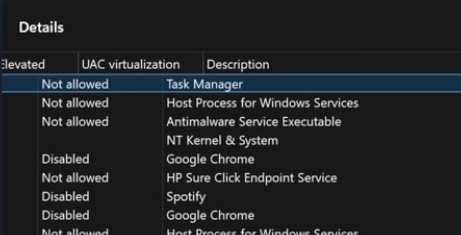
I nearly spat out my Pepsi when Dave Plummer was doing another Task Manager demonstration on Windows 11, and on his very own video footage the columns couldn't keep up with the headers because Windows 11 is so bloated and rotting... it doesn't matter if you run it on the fastest x86 machine possible, these graphical glitches and slowdowns are a coding problem:
There's just no helping it, these problems can't be fixed. And just a reminder, all of these problems are exclusive to Windows-- literally every other operating system I use does not exhibit these awful problems (and I use a lot of different operating systems: Linux (all major distros), macOS, AIX, OS/2 WARP, and also played around with Solaris and Plan9). Windows evangelists love to claim "Windows isn't the only one to have these problems", for the serious problems--yes--Windows is the only one. Try using multiple operating systems and discover for yourself? But they can't, they have Windows Stockholm Syndrome.
Search for any files on a macOS system and it finds any individual file instantly. Do the same on Windows and you're sitting waiting for it to enumerate and you're lucky if it even finds anything, often times it gives up searching every directory. Why? Because NTFS uses a "master file table" it doesn't fair well with tiny files and is also the reason why it still needs to be defragged. Defragging on Windows never went away, it's still there but as a silent scheduled task in the background.
Regressions and the Sweenster
Even _Tim Sweeney_ can't take the heat with how bad Windows is getting. But Tim should know... Microsoft will always take shortcuts. That was always the case, especially in the 90's.
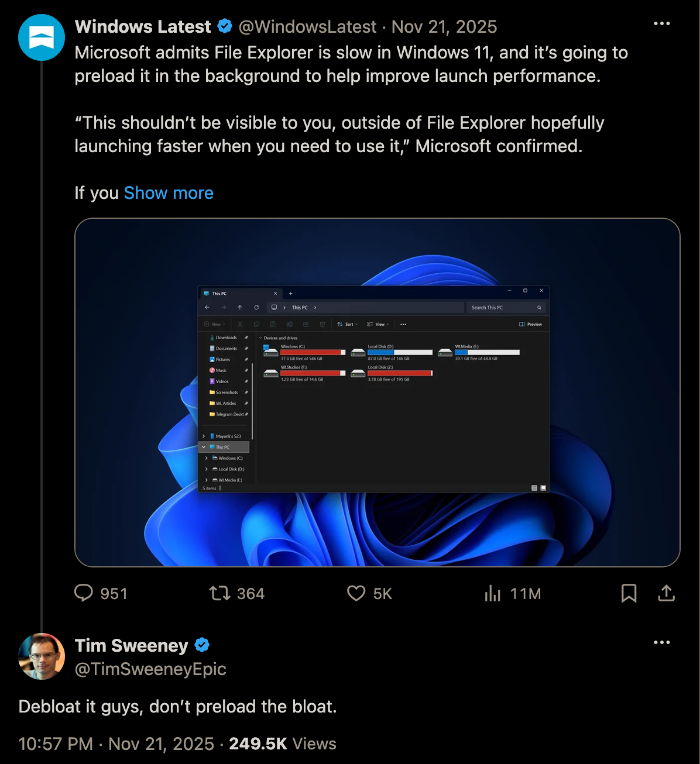
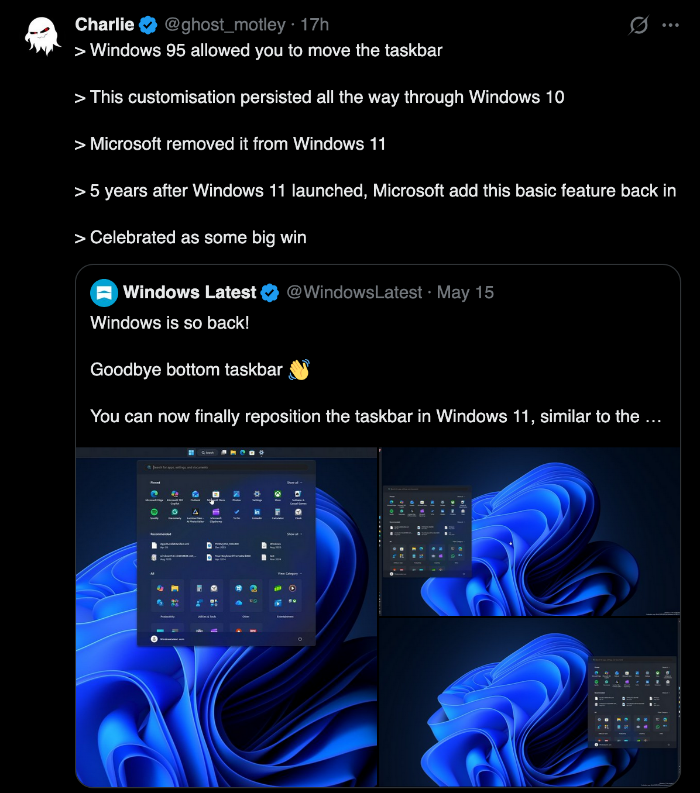
The regressions are real. Windows 10 itself had so many regressions going from Windows 7, like the inability for proper theming and the 'banning' of certain colours that don't work with the text colours because they can't change. The fact that there is celebration for Microsoft re-introducing the basics in Windows 11 for features _even 10 had_, is sad. Both of these problems stem from Microsoft's taskbar rewrite by the way, like Explorer, it has serious latency problems...
Bill Gates Himself Calls Windows 'Crapped Up'
Bill Gates had an infamous rant on the problems of Windows, and this was back in 2003 with XP (a version that most people, but not myself, absolutely praise). So if XP was this bad, imagine how much worse 11 would be if Bill tried using that. All of the problems Bill is discussing about XP are tame compared to what 10 and 11 have done.
I am quite disappointed at how Windows usability has been going backwards and the program management groups don't drive usability issues. Let me give you my experience from yesterday. I decided to download Moviemaker and buy the Digital Plus pack so I went to Microsoft.com. They have a download place so I went there. The first 5 times I used the site it timed out while trying to bring up the download page. Then after an 8 second delay I got it to come up. This site is so slow it is unusable. It wasn't in the top 5 so I expanded the other 45. These 45 names are totally confusing. These names make stuff like: C:\Documents and Settings\billg\My Documents\My Pictures seem clear. They are not filtered by the system I came in on and so many of the things are strange. I tried scoping to Media stuff. Still no moviemaker. I typed in moviemaker. Nothing. I typed in movie maker. Nothing. So I gave up and sent mail to Amir saying -- where is this Moviemaker download? Does it exist? So they told me that using the download page to download something was not something they anticipated. They told me to go to the main page search button and type movie maker (not moviemaker!). I tried that. The site was pathetically slow but after 6 seconds of waiting up it came. I thought for sure now I would see a button to just go do the download. In fact it is more like a puzzle that you get to solve. It told me to go to Windows Update and do a bunch of incantations. This struck me as completely odd. Why should I have to go somewhere else and do a scan to download moviemaker? So I went to Windows update. Windows Update decides I need to download a bunch of controls. Not just once but multiple times where I get to see weird dialog boxes. Doesn't Windows update know some key to talk to Windows? Then I did the scan. This took quite some time and I was told it was critical for me to download 17 megs of stuff. This is after I was told we were doing delta patches to things but instead just to get 6 things that are labeled in the SCARIEST possible way I had to download 17 meg. So I did the download. That part was fast. Then it wanted to do an install. This took 6 minutes and the machine was so slow I couldn't use it for anything else during this time. What hte heck is going on during those 6 minutes? That is crazy. This is after the download was finished. Then it told me to reboot my machine. Why should I do that? I reboot every night -- why should I reboot at that time? So I did the reboot because it INSISTED on it. Of course that meant that completely getting rid of all my Outlook state. So I got back up and running and went to Windows Update again. I forgot why I was in Windows Update at all since all I wanted was to get Moviemaker. So I went back to Microsot.com and looked at the instructions I have to click on a folder called WindowsXP. Why should I do that? Windows Update knows I am on Windows XP. What does it mean to have to click on that folder? So I get a bunch of consulting stuff but sure enough one of them is Moviemaker. So I do the download. The download is fast but the install takes many minutes. Amazing how slow this thing is. At some point I get told I need to go get Windows Media Series 9 to download. So I decide I will go do that. This time I get dialogs saying things like "Open" or "Save". No guidance in the instructions which to do. I have no clue which to do. The download is fast and the install takes 7 minutes for this thing. So now I think I am going to have Moviemaker. I go to my add/remove programs place to make sure it is there. It is not there. What is there? The following garbage is there: Microsoft Autoupdate Exclusive test package, Microsoft Autoupdate Reboot test package, Microsoft Autoupdate test package 1, Microsoft Autoupdate test package 2, Microsoft Autoupdate test package 3. Someone decided to trash the one part of Windows that was usable? The file system is no longer usable. The registry is not usable. The program listing was one sane place but now it is all crapped up. But that is just the start of the crap. Later I have listed things like Windows XP Hotfix see Q329048 for more information. What is Q329048? Why are these series of patches listed here? Some of the patches just list things like Q810655 instead of saying see Q329048 for more information. What na absolute mess. Moviemaker is just not there at all. So I give up on Moviemaker and decide to download the Digital Plus Package. I get told I need to go enter a bunch of information about myself. I enter it all in and because it decides I have mistyped something I have to try again. Of course it has cleared out most of what I typed. I try typing the right stuff in 5 times and it just keeps clearing things out for me to type them in again. So after more than an hour of craziness and making my programs list garbage and being scared and seeing that Microsoft.com is a terrible website, I haven't run Moviemaker and I haven't got the plus package. The lack of attention to usability represented by these experiences blows my mind. I thought we had reached a low with Windows Network places or the messages I get when I try to use 802.11 (don't you just love that root certificate message?) When I really get to use the stuff I am sure I will have more feedback.
Microsoft Can't Spell (NTDSUTIL)
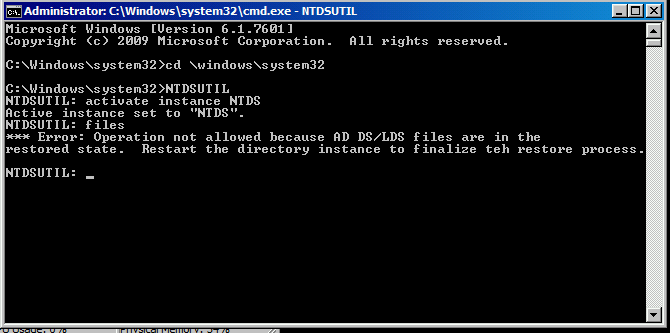
And here's a hidden gem in one of my Windows screenshots for all of those Microsoft evangelists who think the product is perfect! This was being done on a Server 2008 host, but NTDSUTIL still exists in Windows today. When I was trying to resuscitate AD on a restored VM, NTDSUTIL spat out this error, I nearly lost it: "~ to finalize teh restore process." Okay Microsoft... I'll finalize TEH restore process. And by the way, it didn't work, but with typos in the error messages is it really any wonder?
The Future Is Changing
I predict "Wintel" as a whole will cease to exist in the far distant future. x86 is already on a (very) slow decline and Apple showed us how great the M series can be while getting full application support (Intel and AMD even teamed up because of this threat). Microsoft is seeing more migrations to macOS and Linux than ever before, and it's shocking how many people I see giving up on Windows 11 and just switching to Linux that I would have never anticipated. That, and Windows is seriously being sandwiched on multiple fronts as mobile increases and people rely less on conventional PCs. The cost of building your own PC now doesn't help. I wonder how Microsoft will attempt to pivot with this, they could possibly team up with Nvidia for some awful closed architecture "AI" appliances, but getting people to actually use them would be the problem.
Furthermore, I myself have moved all of my proprietary software and workloads between Linux and macOS; all of the vendors who haven't traditionally supported those platforms, are. This is a huge thing that Microsoft should be concerned about but don't really seem to be.

In a way, I'm kind of glad Windows 11 is amplifying all of Windows 10's problems and degradations so that everyone who kept praising it can reap their due reward. There'll be a time when "Windows" finally ends, imagine that. Hopefully nothing similar to it ever takes its place again.
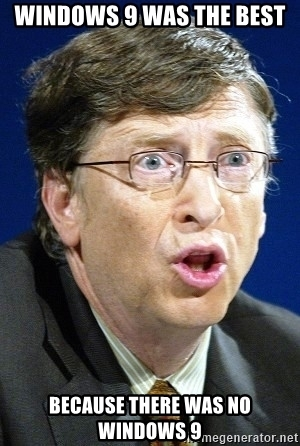
P.S. If you think I started out as a "mac person" or a "Linux user" due to the criticality of this article, you are mistaken. I used to laugh at macs and PCs running Linux because they couldn't play any games or run any important software. But also consider this criticism lies with where Microsoft has taken Windows... for instance: I can't believe I'm saying this now... but Windows Vista is actually a usable product and it doesn't spy on you. Who would have thought that's where we'd be in our current time?
Others Are Fed Up
Hey, it's not just me. Others are fed up too. And since migration paths away from Windows are actually viable now (a thing that was not possible even just 5 years ago), we're all moving away.
- From Microsoft to Microslop to Linux: Why I Made the Switch
- Windows vs Linux: I Ran Both for 6 Months and Now I Have Opinions That Will Make People Angry
- Windows 7 and XP still more popular than Windows 11
- I ditched Windows 11 for Linux - and you should, too
- I switched to Linux and I can't imagine going back to Windows in 2026
- Switching to Linux in 2026: Why I Finally Left Windows for Good
- Why Millions Are Leaving Windows For Linux?
- Hot Topic: Why Windows 11 Could Be Good News for Ubuntu
Gosh, by the jaded and dismissive attitude by hardcore Microsoft evangelists, you'd think nothing was wrong with Windows and that there were no privacy concerns. Even Ed Bott's colleague Jack Wallen has a piece giving reasons why to ditch Windows for Linux.
I curated ones that were not AI generated / written without substance. And yeah, there were some weird ones I came across that appear to be written by AI, using copious emojis and stating obvious things without delving into the particulars-- what a time to be alive that I now have to dig around to find genuine content. ANYBODY can say "I'm migrating to Linux" but not provide substance as to why, because there may be situations where you can't just migrate to Linux/macOS from Windows; a problem holding back many from migrating to Linux was gaming, but that's now been solved... unless you're Tim Sweeney implementing anticheat. But I have a solution for you: just don't play Tim Sweeney's games. They suck anyway, play Caesar 3 or Dungeon Keeper 1.
AI is unaware of these contexts so it just lists generic things that concern nobody; if you had anyone choosing between performance and actually being able to run their software, they would choose running their software. AI would be like "oh... everybody wants performance and options and cutting edge and freedom"... whatever, that's not explaining the problem of either Windows --or-- why it's viable to jump to non-Windows ecosystems now.